

SBOMscanner 0.11.0 release
Author:
Published:
We are happy to announce SBOMscanner v0.11.0. This release introduces an MCP
server for AI assistants, a new way to target a subset of a registry from a
ScanJob, supply chain hardening with zizmor,
and several fixes for race conditions in the storage controller watches.
MCP server
SBOMscanner now ships an MCP server that puts everything the controller knows
in front of your AI assistant of choice. Instead of crafting kubectl queries
across CRDs and joining the results in your head, you can ask Claude, Claude
Code, GitHub Copilot, or any other MCP client questions like “which workloads
in cluster prod are running an image with a critical CVE?”, “give me the
top ten most vulnerable images across all my registries”, or “open a scan for
the new tag I just pushed to library/nginx”. The assistant calls into
SBOMscanner to list registries, scan jobs and workloads, inspect specific
CVEs, follow scan progress, manage VEX hubs, and (when you want it to)
create, update, or delete the corresponding resources for you.
To turn it on, create a Secret with the credentials and enable the chart flag:
apiVersion: v1
kind: Secret
metadata:
  name: sbomscanner-mcp-auth
  namespace: sbomscanner
stringData:
  username: mcp-user
  password: changeme
helm upgrade --install sbomscanner sbomscanner/sbomscanner \
  --namespace sbomscanner \
  --set mcp.enabled=true \
  --set mcp.auth.secretName=sbomscanner-mcp-auth
Then point your MCP client at the server endpoint, with the base64-encoded
credentials in the Authorization header:
{
  "mcpServers": {
    "sbomscanner": {
      "type": "http",
      "url": "https://localhost:8222/mcp",
      "headers": {
        "Authorization": "Basic BASE64_CREDENTIALS"
      }
    }
  }
}
The full configuration reference (TLS, rate limiting, read-only mode, and more) is in the MCP server user guide.
Once the client is connected, try a few prompts to get a feel for what the server can do:
- “Show me a table of all images with critical or high CVEs across every registry, sorted by severity count.”
- “Which workloads in the
paymentsnamespace are affected by CVE-2024-XXXX, and what image tag are they running?” - “Trigger a scan of
library/nginxfor any tag newer than1.27.0and let me know when it finishes.” - “Summarize the diff in vulnerabilities between the last two scans of my
productionregistry.”
Below is one of those prompts running against Claude, which produces a table with details of the most vulnerable workload in the cluster:
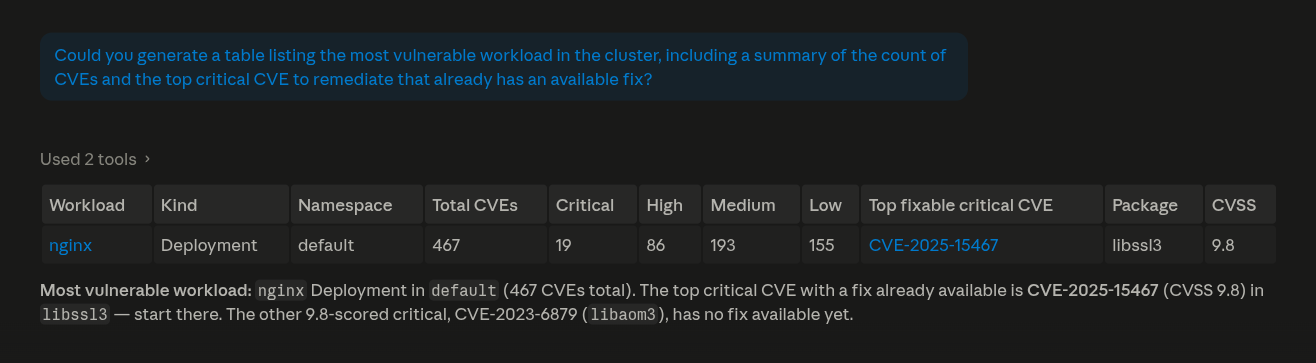
If you come up with a prompt that works particularly well for your team, send it our way on Slack or GitHub discussions. We would like to collect the good ones.
Target a subset of a registry from a ScanJob
A ScanJob can now target a subset of the referenced Registry via the new
spec.repositories field, instead of always scanning every repository and
every matchCondition.
Take a Registry that watches two images, nginx (any version newer than the
current production baseline) and postgres (one pinned tag):
apiVersion: sbomscanner.kubewarden.io/v1alpha1
kind: Registry
metadata:
  name: docker-hub
  namespace: default
spec:
  uri: docker.io
  repositories:
    - name: library/nginx
      matchConditions:
        - name: "newer than current"
          expression: "semver(tag, true).isGreaterThan(semver('1.27.0', true))"
    - name: library/postgres
      matchConditions:
        - name: "pinned 16.4"
          expression: "tag == '16.4'"
A ScanJob against the whole Registry would pull SBOMs for every matching
nginx tag and for postgres 16.4. With spec.repositories you can scan just
nginx, and only the tags newer than the baseline:
apiVersion: sbomscanner.kubewarden.io/v1alpha1
kind: ScanJob
metadata:
  name: nginx-newer-than-baseline
  namespace: default
spec:
  registry: docker-hub
  repositories:
    - name: library/nginx
      matchConditions:
        - newer than current
That gives you a way to re-scan a single image after a rebuild, or recheck one match condition after a CVE disclosure, without paying for a full registry scan.
This is also the mechanism that powers the optimization behind the
WorkloadScan
feature when scanOnChange is on: instead of rescanning the whole managed
Registry every time a workload is created or updated, SBOMscanner now emits
a targeted ScanJob that covers only the images actually in use by the new
or changed workload.
The full reference for the field is in the scanning registries guide.
Supply chain hardening with zizmor
We have added zizmor to our CI pipeline
and worked through its findings across the SBOMscanner workflows. The most
relevant change is the hardening of run blocks against template injection,
where GitHub Actions context values are no longer interpolated
directly into shell scripts.
Alongside zizmor, the govulncheck results are now uploaded as SARIF to the
GitHub security tab, so vulnerabilities surface in the standard code-scanning
view rather than failing the workflow outright.
Race condition fixes in the storage watches
The storage component had two subtle race conditions in the way it interacted with NATS and the local store, and both are fixed in this release:
- The watcher now waits for its NATS subscription to be ready before publishing events, so the first events after startup are no longer lost.
- The store no longer drops
ADDevents when a concurrent delete happens on the same key, which previously left the cache in an inconsistent state.
These fixes make scan results land in the storage layer reliably, especially under load and during controller restarts.
Getting in touch
Are you using SBOMscanner? Are you interested in contributing?
Join the conversation on Slack or GitHub discussions.
We would love to hear from you!